
Final Screenshot
Sea War
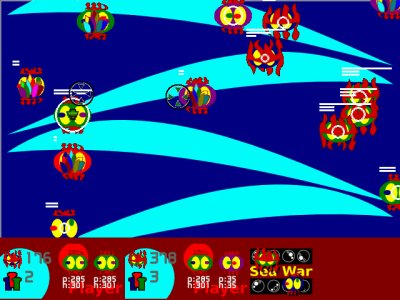
 This is a 2D real-time strategy game!
It lets two player play on one machine.
This is a 2D real-time strategy game!
It lets two player play on one machine.
P.S. This game is for my sons, They are 4+ and 2+.(four years old and two years old)
Awards
Scores
Ratings (show detail)
Overall: 2.2
Fun: 1.7
Production: 2.4
Innovation: 2.4
1% of respondents wished to disqualify the entry.
Respondents: 13
Files
| File | Uploader | Date |
|---|---|---|
|
save2008040401.jpg
Final Screenshot |
milker | 2008/04/20 07:45 |
|
seaWar-1.0.zip
— final
Sea War 1.0 Release |
milker | 2008/04/04 23:15 |
|
keyboard-control.png
Keyboard handle |
milker | 2008/04/04 23:02 |
|
seaWar-1.0-rc2.zip
— final
SeaWar 1.0 rc2 release |
milker | 2008/04/04 21:06 |
|
gamedesign.jpg
Game Designning |
milker | 2008/04/04 07:57 |
|
gamepad.png
GamePad Control |
milker | 2008/04/04 05:03 |
|
player-info.png
Player Area Infomation |
milker | 2008/04/04 04:00 |
|
ObjectInfoLineText.png
Robot infomation in Text mode |
milker | 2008/04/04 03:02 |
|
ObjectInfoLine.png
Object Info display in line mode |
milker | 2008/04/04 02:48 |
|
seaWar-alpha-0.9.zip
— final
0.9 Alpha release |
milker | 2008/04/03 17:46 |
|
save2008040402.jpg
Play in One User Mode |
milker | 2008/04/03 16:31 |
|
save20080404.jpg
The Game is Over. |
milker | 2008/04/03 10:10 |
|
save20080403.jpg
Sea War in 2008-04-03 |
milker | 2008/04/02 17:30 |
|
save20080402.jpg
Screen display Object Info |
milker | 2008/04/02 03:59 |
|
save20080401.jpg
2008-04-01 has focus dot |
milker | 2008/04/01 16:55 |
|
save-2008-4-1.jpg
Sea War 2008-4-1 |
milker | 2008/03/31 17:48 |
|
sea_war_logo2.jpg
Sea War Logo |
milker | 2008/03/31 17:40 |
|
seawar.jpg
Sea War MKII |
milker | 2008/03/31 08:58 |
|
sea-war.jpg
The sea war |
milker | 2008/03/30 16:53 |




Diary Entries
Change
 milker on 2008-03-24 08:29
change it.
milker on 2008-03-24 14:49
Boom
milker on 2008-03-26 04:10
New It
milker on 2008-03-30 02:35
- Just use 8bit color
- follow robot theme
- add configure tool.
- use the new game logic
The robot icon
milker on 2008-03-30 14:20

Another robot icon
milker on 2008-03-30 15:28

The green robot icon
milker on 2008-03-30 15:36

The sea nettle robot
milker on 2008-03-30 16:06

Bubble Boom
milker on 2008-03-31 03:22

Write a New game.
milker on 2008-03-31 03:31
I am sorry! because I was don't follow the rule before.
:>
Now power
milker on 2008-04-01 02:56
Everything was stoped.
##>
The Focus Dot
milker on 2008-04-01 16:18

This is Focus Dot, it use for user handler, I like the handler is Joystick and many keys to handle user input.
Two Focus Dot
milker on 2008-04-01 16:53

People Icon
milker on 2008-04-02 02:57

This is the people icon, that show player how many robot is alive.
Mark, Just a mark.
milker on 2008-04-02 07:40

Children are playing Sea War.
milker on 2008-04-02 09:42
SeaWar Alpha 0.8 Release
milker on 2008-04-02 17:27
 Enjoy it. :>
HowTo play the game ?
Just press 'K_h' and see the help page.
Or see the source code. heeee!!!

SeaWar 0.9 Alpha Release
milker on 2008-04-03 16:27
You can run in non joystick mode, one joystick mode and two joystick mode, it will auto detect your system's joystick.
Just Download it -- seaWar-alpha-0.9.zip
Sea War is running in One User Mode, now!!

P.S.
- Sea War cann't running in more then two joystick mode. ( has bug, now.)
- Sound is Ok!
Game configure tool or Document ?
milker on 2008-04-03 17:54
I want write a configure tool for my game.
But I haven't more time for it.
I think: I need to choice:
- configure tool
- Document for game. (my english is poor! maybe you cann't understand.)
Why write a Game ? ( SeaWar )
milker on 2008-04-04 00:04
In 2008 easter, I wanted to write someting. that can help my sons to learn.
I have two gamepad and I am a linux user too.
So, I started to learn write a game. It is name Racing Killer. it is a shooting game.
My two sons love it more. they play it everyday.
I was decide to post it to internet. I found pyweek
pyweek#6 is my first challenge about computer skill.
I join it and post Racing Killer in there.
But it was broke the rule( because the game isn't write this week.), so I write a new game, it name SeaWar.
Game philosophy (Sea War)
milker on 2008-04-04 00:31
Sea War is a 2D real-time strategy game. It isn't like C&C
, it just design for children about 4+ ( fours year old. ), so the game
logic is very simple.Another thing, Sea War is design for multi-player, they can play in same time and using one LCD monitor. they are taking up them joysticks and play it, they are talking and laughing.
I don't know howto active a two mouse in linux, so Sea War use joystick to play, and my son love joystick than keybroad and mouse.
Coding style
milker on 2008-04-04 01:57
In many year ago. I started learning OO (Object Oriented) in
programming skill. when I learned ruby and Java .OO is difference than Old C style. ( my first computer language is Basic . it was running on a 8089 processor. it had not OO :<
One day my friend told me, he wrote a new java game.
He said that, when he did re-create a world. there had a ball and a stick.
- what color was the ball has?
- the ball was moving like ?
- what color was the stick has?
- the stick was moving like ?
- when the stick met the ball ?
- what happen, when the stick met the ball ?
- or the world has power object. it was becoming ball and stick ? that was liked Aristotle said.
when you care ball and stick. the world ( game ) should become very interest.
I did same in Sea War.
Sea War player manual
milker on 2008-04-04 05:12
SeaWar has two part in game screen, Top is the sea, bottom is the player information broad. Robots is working in sea area.
Robots in SeaWar

|
Robot
Octopus is player soldier in the game. The game have green octopus
and blue octopus.(two tearm) they can run and fight, they are automatic. they split up, when they have full power. |

|
Robot See Nettle, No
player own them, it is growing in see. They can grow, but cann't move location in the sea, except player move it. Robot Octopus eats it to incoming them power. |
Robot's information (line mode and Text mode)


In the every robots ( Octopus and See Nettle ), It has some usefull infomation.
Line mode
- power circle -- It shows the robot power. See Nettle can use the life circle to remote-kill another robot.
- life line -- robots has a fix life time, whe the time is over it will die.
- high point line -- It is recode the robot highest power point in his lifetime.
Text mode
Player can use text mode display robot's infomation in player area. ( Pleas see PlayerControl )
- p -- power
- h -- high point
- l -- life
Robot's mark
Robot has rich mark sign.

|
Fire, When robots the power is low. it will burning and display the fire sign. |

|
Mark, It is a player handle sign, Please see PlayerControl. |

|
Focus, It is a player handle sign, Please see PlayerControl. |

|
X, Robot is hitting. |
Player Area Information
 SeaWar
has two playarea, (TODO: SeaWar can play more then two player
in same time, so maybe SeaWar can has more then two playerarea
in future.
)
SeaWar
has two playarea, (TODO: SeaWar can play more then two player
in same time, so maybe SeaWar can has more then two playerarea
in future.
) This information area can help user to make a good decide and enjoy control robots.
Many useful information in playarea.
- Player team total powers: It shows how many power in player team, When player's total powers lost, other player will win the game.
- Team Members: It shows how many soldiers in player team.
- mark robot: Player can mark any robot in game. ( See PlayerControl )
- catch robot: It shows what robot is catched. Player can safely move the robot location in the Sea.
- mark robot and focus robot: Display a robot's information in text mode.
HowTo Play the Game (PlayerControl)
SeaWar is design for 4+ and 2+ children. so all robots don't need control. they should working smooth for themself!!
If the player want to control them, player can move the focus mark in the sea, and do:
Mark
Player move focus sign, focus will automatic scan robots information and display text mode information in focus robot area and mark robot area.
If player want to mark someone. (It will keep display marked robot's information in mark area). player can use mark, when robot marked, it will display mark sign in its face. Of course player can release the mark.
Catch
Player move focus sign, focus can catch a robot in one times. when player catchs a robot, the robot face will display focus sign, then player can safely move the catch-robot anywhere in sea. when player free catch. the robot will working automatic again.
Mission
When Player complete destruction another side's robot soldier. He will win the game.
GamePad Control structure

Tips
- move Robot See Nettle to feed your soldier.
- move the less life time soldier to eat robot see nettle.
- ......
Keyboard Support ( When system hasn't joystick )
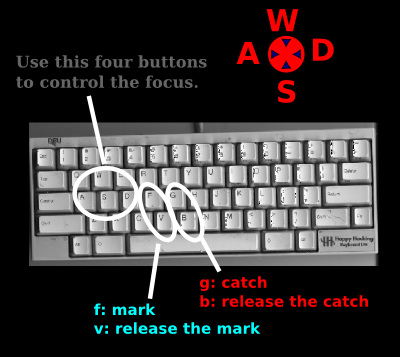
use key [WSAD] for move; [f] for mark, [v] is release mark and [g] for catch, [b] is release catch.

Thank john, who give me idea to support keyboard.
freeze the project
milker on 2008-04-04 10:47
Thank richard, who created PyWeek.
I enjoy it. see you later. ( Maybe in pyweek#7 )
:)
Keyboard's arrow key
milker on 2008-04-04 14:55
 Many game use arrow key to handle robot or car, like running or jumping.
It is easy to handle for more people, but not for my sons.
because my keyboard is Happy Hacking Keyboard.
If my son need to press 'K_UP', he need to press [Fn] + [[]
So, the joystick control is good enough for them. If you don't have any idea to control your robot. Pleas support Joystick ( Thank you !!)
SeaWar 1.0 RC1 Release
milker on 2008-04-04 17:58
I try add keyboard support in game.it can run. but very ugly (has bugs).
:>
use key [WSAD] for move, [fv] for mark and [gb] for catch.
SeaWar 1.0 RC2 Release
milker on 2008-04-04 21:11
Add Keyboard support.I suggest you use joystick to play this game.
Keyboard support just show in non-joystick system ( hasn't joystick ).
use key [WSAD] for move; [f] for mark, [v] is release mark and [g] for catch, [b] is release catch.
P.S. I had compete debug about Keyboard support.
But now the code is ugly.
If I have time, I will clear it later
SeaWar is depend:
- python 2.4( maybe can running in above 1.5 )
- pygame 1.7
Thank john, who give me idea to support keyboard.
SeaWar 1.0 Release
milker on 2008-04-04 23:20
Thank you.
Just say [[[[Thank you.]]]]
special thank my wife.
She support me to join pyweek#6.
See you in pyweek#7
enjoy OpenSource, enjoy Python, enjoy pyweek....
Can I change the final screenshot ?
milker on 2008-04-06 06:03
Please help me. I want to change the final screenshot to
http://media.pyweek.org/dl/6/racingKiller/save2008040401.jpg

Who can help me ?
Sea War Home Page
milker on 2008-04-06 16:25
http://www.milk2cows.com/seawar
You can find addon or later version in here.
SeaWar 1.01 release. ( change focus graphic ).
I haven't python2.5
milker on 2008-04-07 12:06
I am sorry.
I cann't success to test all game in my linux box.
my machine running debian 4.0 and python 2.4
python2.5 isn't full support in debian4.0
SeaWar some lib was coming from RacingKiller
milker on 2008-04-09 03:50
Thank john talk me that.
=== You are supposed to make the game itself, including the lib after the compo started.===
I am sorry. SeaWar was use some old lib, that the lib was create before the compo.
If any people don't like that. I just say sorry. and tell richard to cancel my entry. please.
This is my first times to play in pyweek ! Just say sorry. :(
Can I modify some game and post the link in here ?
milker on 2008-04-09 08:26
Hi, everybody.
I love some game. that was created in pyweek#6. Can I modify it ??
And Post the link in here ??
Thank You for your respondents
milker on 2008-04-20 07:53
I think: the game's logic isn't easy understand.
and the game need two player and two joystick, maybe isn't good for you. But I enjoy it.
Thank you for your respondent.
P.S. I will care the diff type joystick setting in next game. ^^
and keep it easy control from us keybroad.
Thank you for report it cann't running in XP.
I just test it in my linux ( debian ) .
library before challenge
milker on 2008-04-25 23:14
I am sorry,I want to ask another question:some people can use some library, that create before the challenge, and some people cann't.
Why they can? why the cannot??
Dancing Block (post pyweek#6)
milker on 2008-04-30 09:19
It is a post pyweek#6 game.

You will like it.
Now: it require a dancing-pad.

:) it will support keybroad, later.
Project Home: http://code.google.com/p/wormstory/
Dancing Block 1.5 (Keybroad Support)
milker on 2008-04-30 17:51
Dancing Blocks 1.5
Add Keybroad Support. ^^


Dancing Block 2.0 release
milker on 2008-05-07 04:28
Thank you for your care and play.I hope that, you will like it.